
Cloud phone systems, Microsoft Teams Calling, on-premises PBX and call centre solutions, designed, installed and supported by one Australian team.


Free, no obligation. We only use your details to reply to your enquiry (privacy policy).
Brands we support
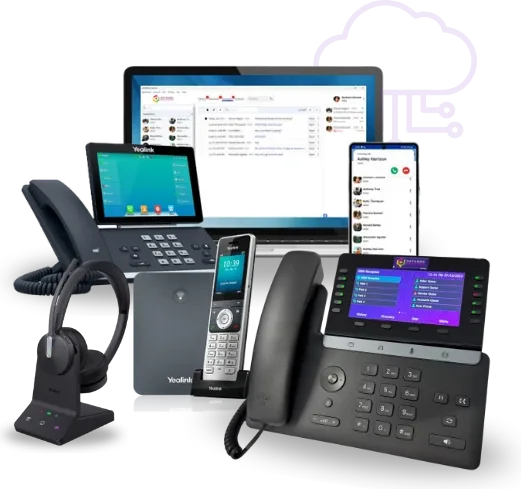
Databox supports a wide range of modern handsets and headsets from leading brands including Yealink, Poly, Jabra and EPOS. We also provide service and support for legacy phone systems from vendors such as Panasonic, NEC, Mitel, Alcatel and Avaya.
Whether you need assistance maintaining your existing phone system, extending its lifespan, or planning a transition to a modern cloud-based solution, our experienced team can help. From legacy telephony support through to the latest hosted communications platforms, Databox has you covered every step of the way.













The basics
Almost every modern business phone system runs on VoIP phone system technology, which carries calls over an internet or IP connection instead of a copper phone line. What really differs is where the system is hosted and how your team gets to it.
 Watch: how a Databox business phone system works
 The phone system lives off site and we manage it for you. Nothing to maintain in the office, and staff connect from desk phones, computers and mobiles.
Cloud Phone SystemsTeams Calling turns Microsoft Teams into your business phone system, so calling, chat and meetings all sit in the platform your team already opens every morning.
Microsoft Teams CallingAn IP PBX stays in your building and connects to the phone network over SIP trunks. It suits businesses that want the system onsite or already have the hardware.
On-Premises PBXOur solutions
From affordable setups for small teams to enterprise-grade platforms: one provider, full support, built around how your business actually communicates.

Systems for small teams that are quick to set up and easy to manage, with auto-attendant, voicemail-to-email and mobile apps included.
Small Business Phone Systems
Scalable systems built for growing teams, with advanced call management, reporting and multi-site connectivity, without the enterprise complexity.
Medium business systems
Enterprise platforms for large, multi-site operations, with advanced security, deep integrations, contact centre capability and full UCaaS support.
Enterprise Phone SystemsIndustry solutions
Every industry communicates differently. We configure and manage phone systems that fit how your team actually works.






Our own platform
VoIP Express is our own hosted calling platform, built for businesses that want the flexibility of a softphone without giving up the features of a full phone system.
Your team calls from a computer, mobile or desk phone, with call recording, transfers and real-time analytics behind them. Because Databox hosts it, support comes from the same Australian team that set it up.
 Watch: VoIP Express in action
 Features
Every system we build includes the call-handling tools a professional business is expected to have, configured around your hours, your teams and your call flows. The ones marked new arrived in 2026.
Automated call answering for your main line, after hours or 24/7. It handles common questions, takes messages and routes callers, so fewer callers end up in voicemail.
AI call answeringCalls transcribed automatically, so you search for a detail instead of replaying the whole recording.
See call summariesReply from your business number in the channel the customer chose, out of the same portal your team takes calls in.
See who is free and who is waiting, and let the system ring customers back instead of holding them.
Capture and store calls for training, compliance and quality assurance.
Monitor call performance, spot the gaps and improve how your team handles calls.
A virtual receptionist answers and routes every call, in and out of business hours.
Messages land in the inbox, so nothing waits on someone checking a handset.
Make and take business calls from any device, wherever your team is working.
Send calls to another number or device so you can take important calls away from your desk.
Connect calls, meetings and conferencing equipment in one setup.
Handle busy periods with queues and live monitoring, and cut customer wait times.
The features available depend on the platform and configuration selected for your business.
Pricing
There is no single price for a business phone system, because the right answer depends on how you want it delivered and what your team needs. Here is what actually moves the number.
Our process
Changing phone systems is more than plugging in new handsets. Numbers, call flows, devices and the network all have to line up, and one project manager owns the whole thing.
Your users, sites, numbers, call volumes and devices.
Cloud, Microsoft Teams or on-premises, and why.
We port your numbers and build your call flows.
Devices, apps and call paths tested before go-live.
We train your team, then support it from Brisbane and Melbourne.
Why us
Our people, our systems and our support all sit here in Australia, with engineers in Brisbane and Melbourne. No offshore call centres.
One person owns your rollout from the first scoping call to go-live, so you know who to ring and don’t have to re-explain your setup.
Run your phone system, business internet and managed IT through one local partner, with fewer suppliers to chase and clear accountability.
Discovery, number porting, configuration, installation, training and ongoing support. We manage the whole journey rather than handing you a box.
Quick answers on VoIP, Cloud PBX, Microsoft Teams Calling, pricing and installation, from the team that sets up business phone systems across Brisbane, the Gold Coast, Melbourne and the rest of Australia.
VoIP is the technology that carries calls over your internet connection instead of a traditional phone line. A hosted PBX uses VoIP, but the phone system itself sits off site and we manage it, so there’s no hardware for you to maintain. An on-premises PBX keeps the equipment at your location, which suits businesses that want full control or already have the infrastructure. We help you choose based on your team size, budget and how you actually work.
It depends on your team size, the handsets you need and the features you want, so we quote a fixed price upfront. Cloud and VoIP systems are billed as a per-user monthly fee, while on-premises systems carry a higher upfront hardware cost scoped to your extensions and features. Your quote sets out what’s included, what it costs and what the term is before you sign anything. Many businesses save up to 70% on call charges by switching to VoIP. Send us a recent bill and we’ll come back with the numbers.
We scope phone systems around how many people need to answer calls and how your team is spread out:
If you’d rather work it out in a minute, take the 60-second quiz or call us and we’ll make a recommendation.
The features worth having are the ones your team will use every day:
You don’t need fibre, but a VoIP phone system does need a stable connection with enough bandwidth for your call volume. NBN, fibre, fixed wireless and business-grade broadband all work. If your current connection isn’t up to it, we’ll tell you before you commit. If you do need to upgrade, we can bundle business internet and the phone system together: one provider, one bill, one support team.
Yes. Number porting is part of every phone system setup we run, so your landline, local, 1300 or 1800 numbers can come with you. How long a port takes depends on the number type and your current carrier. We deal with that carrier directly and book the cutover at a time that suits you, to keep disruption to your calls as low as possible.
Yes. We set up Microsoft Teams Calling using Direct Routing, which turns Teams into your full business phone system. Your team can make and receive external calls from Teams on desktop, mobile or a compatible desk phone, with PBX features like call queues, auto-attendants and voicemail. If you already run Microsoft 365, this is often the cleanest option: one platform, one login, one bill.
Cloud phone systems include automatic failover, so calls keep flowing during an outage. We can divert incoming calls to mobiles, a backup number, a second site or an after-hours service, whichever suits how you operate. For teams where downtime isn’t an option we recommend a backup 4G or 5G connection, and many of our clients run dual-carrier setups for redundancy on both voice and data.
Yes. Our cloud and hosted PBX solutions connect multiple offices and remote staff under a single phone system, with one bill and one support team. Staff take calls from any location on a desk phone, softphone app or mobile, with extension dialling between sites and centralised call routing. We support businesses across Brisbane, Melbourne and nationally, including hybrid and fully remote teams.
It depends on your team size, your sites and how quickly your current carrier releases your numbers, so we set out the timeline in your quote before you sign. Multi-site rollouts are planned site by site. Provisioning, configuration, handset delivery, porting and training are all part of the project, so you’re not left piecing it together.
A PBX (Private Branch Exchange) is an internal phone network that manages multiple extensions, call routing and conferencing across your business. Databox Solutions provides both on-premises and cloud-hosted PBX solutions. If you need advanced call management across several users or departments, a PBX is likely the right fit. Talk to us and we’ll walk you through the options.
Yes. We offer credit for compatible existing handsets when you upgrade, which brings down the cost of your new hardware. Trade-in value depends on make, model, age and condition. Get in touch and we’ll assess your current equipment as part of a free consultation and factor the credit into your quote before you decide.
Yes. Our support and account management teams are based in Australia, with local engineers in Brisbane (Loganholme) and Melbourne. When you call, you reach a real person on our Australian team. No offshore call centres. Our helpdesk runs Monday to Friday, 8:30am to 4:30pm AEST, with optional 24/7 priority support for businesses that need round-the-clock cover, and phone system support and repair is handled by the same local team that built your setup.
Get started
Tell us your team size, your sites and how you answer calls, and our Australian team will recommend the right setup and quote it in writing. No pushy sales.