
On This Page

The NBN reaches Australian premises through seven connection types. Five run on fixed lines: FTTP, FTTN, FTTC, FTTB and HFC. Fixed wireless and satellite cover regional and remote areas. NBN Co sets the type for each address, and it affects the speeds you can order, so it helps to know yours before you choose a business internet plan. This guide explains how each type works, which businesses it suits, and what to look at when a standard NBN service isn’t enough.
What Is NBN?
The National Broadband Network (NBN) is Australia’s wholesale broadband network. NBN Co builds and runs it, and providers such as Databox sell internet plans over it to homes and businesses. Depending on the area, it reaches premises through fibre optic cable, existing copper phone lines, coaxial cable, fixed wireless towers or satellite.
NBN Connection Types at a Glance
| Connection type | Last stretch to your premises | Best for |
|---|---|---|
| Fibre to the Premises (FTTP) | Fibre optic cable | Heavy data use, video conferencing and cloud work |
| Fibre to the Node (FTTN) | Copper from a node in your street | Email, browsing and basic online apps |
| Fibre to the Curb (FTTC) | Copper from a pit at the kerb | Cloud apps, video and online transactions |
| Fibre to the Building (FTTB) | Copper wiring inside the building | Offices and units in shared buildings |
| Hybrid Fibre-Coaxial (HFC) | Coaxial cable | Urban businesses with moderate to high data needs |
| Fixed Wireless | Radio signal from an NBN tower | Regional and rural sites |
| Satellite | NBN Sky Muster satellite | Remote sites with no other NBN option |
How Each NBN Connection Type Works
Fibre to the Premises (FTTP)

FTTP runs fibre optic cable all the way from the street into your building, with no copper in the line. It supports the fastest NBN speed tiers and holds those speeds well, which makes it the strongest standard NBN connection for business.
Best for: businesses that rely on video conferencing, move large files or run most of their work in the cloud.
Fibre to the Node (FTTN)

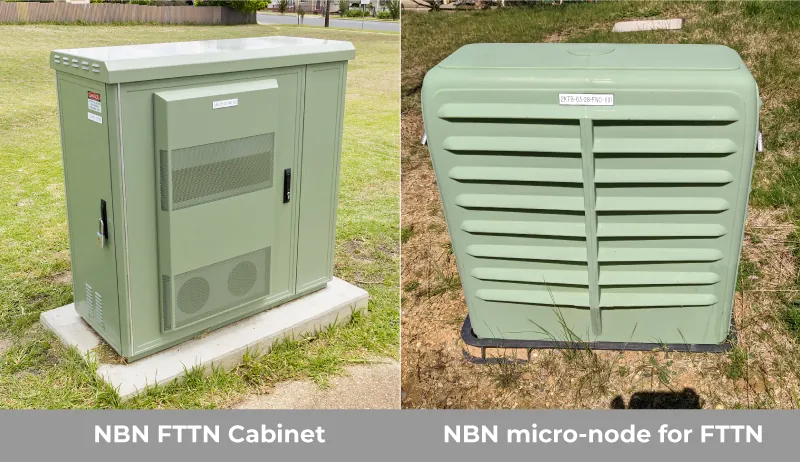
With FTTN, fibre runs to a cabinet in your street called a node. Your existing copper phone line carries the connection the rest of the way, using VDSL technology. Copper is slower than fibre, so the further your premises is from the node, the lower the speed you can expect.
Best for: day-to-day email, web browsing and basic online applications.
Fibre to the Curb (FTTC)

FTTC takes fibre to a small distribution point in the pit outside your premises. From there your existing copper line covers the last few metres. Because that copper run is much shorter than on FTTN, FTTC usually gets closer to the speed you pay for.
Best for: businesses using cloud applications, video streaming and online transactions.
Fibre to the Building (FTTB)

FTTB brings fibre to a communications room, often in the basement, of an office block or apartment complex. The building’s existing copper wiring then connects each unit, using the same VDSL technology as FTTN. If you lease space in a multi-tenant building, there’s a good chance this is your connection type.
Best for: businesses in office buildings and apartment complexes that need several devices online for collaboration and cloud computing.
Hybrid Fibre-Coaxial (HFC)

HFC uses the coaxial cable network also used for pay TV and cable internet. Fibre carries the signal to your area, and coaxial cable runs the rest of the way into your premises. It’s common in metropolitan areas, supports high speeds, and suits premises that already have a coaxial wall outlet.
Best for: urban businesses with moderate to high data needs, including VoIP phone calls.
Fixed Wireless

Fixed wireless sends the connection by radio from an NBN tower to an antenna on your building. NBN Co uses it in regional and rural areas where running cable isn’t practical. Speeds depend on your distance from the tower, and weather can affect performance.
Best for: small businesses in regional or rural areas with moderate internet use.
Satellite
Where there’s no fixed-line or fixed wireless coverage, NBN Co connects premises through its Sky Muster satellites. Satellite reaches the most remote parts of Australia, but the signal’s long round trip adds noticeable lag, which video calls and phone calls feel most.
For remote or rural business sites where NBN services aren’t available or reliable, Databox can also set up Starlink satellite internet.
Best for: remote sites with no other NBN option.
Check Your NBN Connection Type
Your connection type is tied to your address. To find it, use the address check on the nbn website, ask your current provider, or ask us when you request a quote. The NBN connection box on your wall is another clue, because each type uses different equipment. Our guide to rebooting your NBN box shows what the common boxes look like.
The type also limits which speed tiers you can order. Our guide to NBN speeds for business covers the tiers. If you’re moving premises, check the new address before you sign the lease, since a different building can mean a different connection type.
Business NBN vs Home NBN
Home and business plans run on the same NBN connection types. The differences come from the plan and the provider.
- Service levels: business plans can add an enhanced service level agreement (eSLA) with faster fault restoration targets. See our eSLA options.
- Static IP address: you need one for hosting servers, remote access and some business software. Every Databox business NBN plan includes one.
- Data and speed: Databox business NBN plans have unlimited data with no speed shaping, for video calls, cloud computing and large data transfers.
- Support: our Australian team supports your connection, and we can manage your router and firewall as an add-on.
- Room to grow: you can change plans or add services as your business grows.
Business plans can cost more than home plans because of these extras, and offerings vary between providers. For a fuller comparison, read Do Australian Businesses Need Business NBN?
When Business Fibre Makes Sense
Standard NBN plans share network capacity with other users, so speeds can slow during busy periods. If your business moves a lot of data or can’t work without the internet, a dedicated connection may suit you better. Business fibre and NBN Enterprise Ethernet give your business its own bandwidth, the same speed up and down, and a service level agreement. Availability depends on your building, so we check your address first.
Plan a Backup Connection
Any connection type can drop out, whether from a cut cable, a storm or an equipment fault. A backup line means your team can keep working while the main service is restored. Databox offers two kinds:
- 4G failover, which moves your internet onto the mobile network when the fixed line goes down.
- A second fixed line from a different supplier or on a different physical route, so a single fault is less likely to take out both.
Technical Terms Explained
- Fibre optic cable: thin, flexible strands that carry data as light. Fibre gives the fastest and most consistent connections.
- Copper wire: the metal cable used for phone lines for decades. FTTN, FTTC and FTTB use it for the final stretch.
- Node: a street cabinet where the NBN’s fibre meets the existing copper lines.

- Coaxial cable: the thicker cable used for pay TV and HFC internet.
- VDSL: the technology that carries fast internet over copper phone lines on FTTN and FTTB connections.
- Service level agreement (SLA): an agreement that sets out the service targets your provider works to, such as how quickly faults are restored.
- Static IP address: an internet address that stays the same, unlike a dynamic address, which can change. Some business systems need one.
Get Help Choosing Business Internet
Databox supplies business NBN, fibre and Enterprise Ethernet to businesses across Australia, supported by our Australian team. Tell us your address and how your team uses the internet. We’ll check which connection types are available and recommend a plan that fits.


