
Brisbane · Melbourne
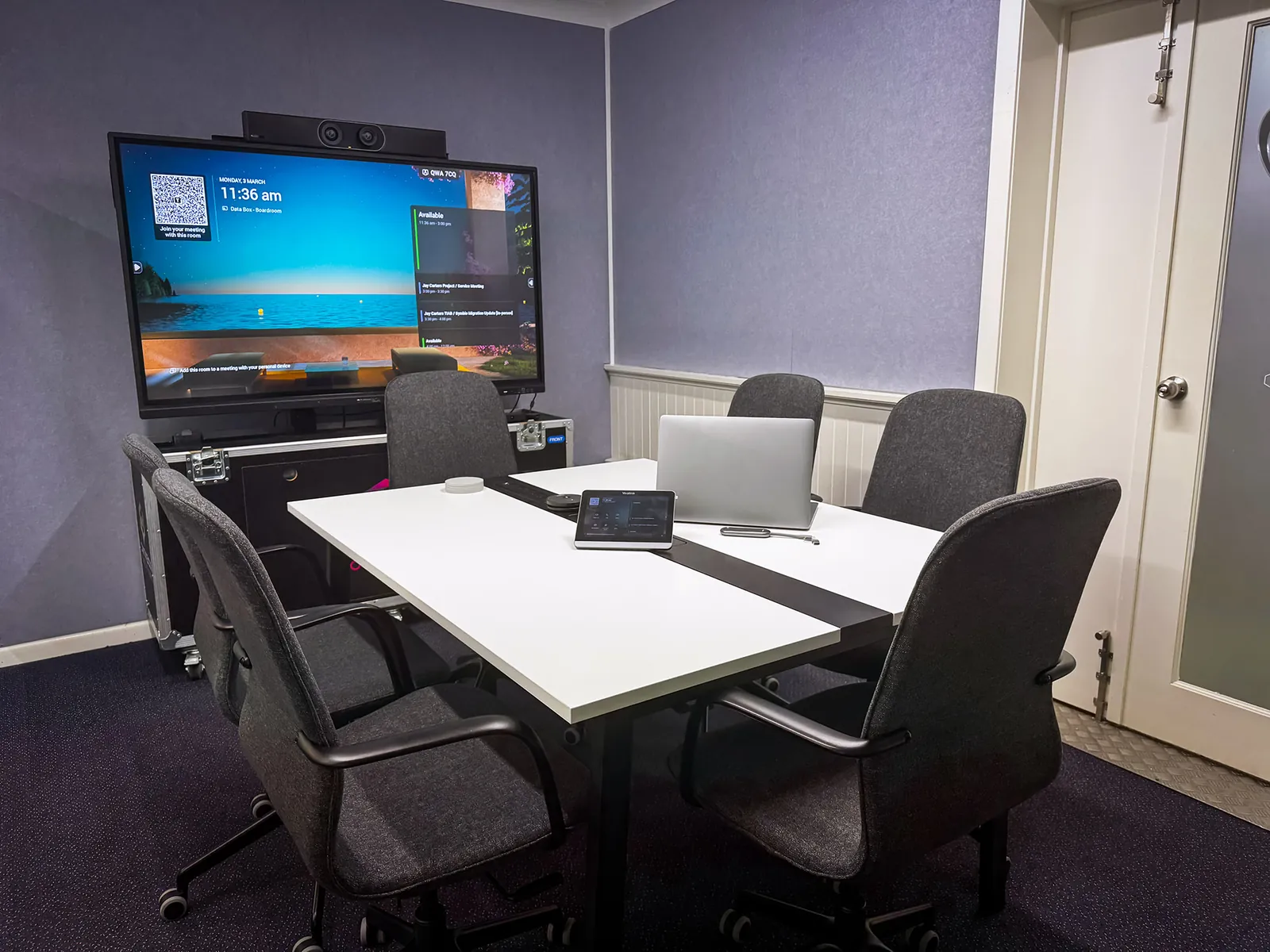
We supply and install business-grade video conferencing equipment in Brisbane for meeting rooms, boardrooms, medical practices and hybrid offices. Your team gets clear video and audio on Microsoft Teams, Zoom or Google Meet, whether the meeting is down the hall or across the country. Tell us about your room and we’ll recommend the right setup.
Free, no obligation (privacy policy). Prefer to talk? Call 1300 603 404.
Brands
Video bars, cameras, microphones and room systems from these manufacturers, set up for the meeting platform your team already uses.










Room packages
Start with the size of the room and the number of people who use it. We match the camera, audio and screens to that, then quote the whole setup.

Up to 6 people
Huddle rooms are usually about 3m x 3m, which suits a single display mounted at eye level. An all-in-one video bar with built-in speakers, microphones and a wide-angle camera covers the room, and it’s plug and play.

Up to 10 people
A room of around 4m x 8m seats up to 10, and some people sit well back from the camera. That calls for a more capable camera and speakerphone and a larger display, so people further from the camera can still be seen and heard.

10+ people
For boardrooms, large meeting rooms and training rooms of about 6m x 12m or more. We design the camera and microphone coverage around your room, including the seats furthest from the screen.
Every package is quoted for your room, and installation is quoted separately. Options include wireless content sharing, dual-screen setups, startup training and ongoing support.
Popular equipment
We often recommend these all-in-one video bars for small and medium rooms. We’ll confirm the right model once we know your room.

Small rooms
A conference room camera that’s simple to set up. Its 180° field of view makes the most of small meeting spaces.

Medium rooms
An all-in-one video bar with a 20MP 4K Ultra HD camera, a 95° field of view and Poly DirectorAI smart camera technology. A good fit for medium conference rooms.

Medium rooms
An all-in-one collaboration bar running Microsoft Teams Rooms on Android. It’s plug and play, which keeps setup simple.

Huddle rooms
An all-in-one video bar built for huddle rooms and small spaces, shown here with the Logitech Tap IP touch controller.
Meeting room installations
We fit out meeting rooms, boardrooms, medical practices, training rooms and hybrid offices, from a single huddle room to rollouts across several sites. Our team supplies the equipment, installs it and connects it to your meeting platform.
Good video conferencing lets teams in different locations make decisions together without waiting for the next trip. People tend to take part more when they can see and hear each other properly, and you can cut down on travel. We tailor each setup to your sector, whether that’s finance, healthcare or education.


Key features
Professional audio and video equipment, built for a room that’s in use all day.
IT EquipmentHigh-definition cameras and room microphones help remote attendees see and hear what’s happening in the room.
Microsoft Teams, Zoom, Google Meet and other popular platforms, configured for the one your team uses every day.
Teams Rooms GuidePut a laptop on the room display without hunting for the right cable.
Work on an electronic whiteboard together in real time. It suits brainstorming sessions with people in the room and online.
Interactive WhiteboardsStart meetings from the touch panel on the table, and add booking screens so staff can see when a room is free.
How it works
We look at your room layout, the number of participants and how the room is used.
You get a recommendation that suits your room and budget, with installation quoted separately.
Our technicians mount, cable and configure the equipment and connect it to your platform.
We show your team how to start meetings and share their screens.
Remote and on-site support, maintenance and upgrades from our Australian team.
Reviews
More than 1,000 Australian businesses run their IT, phones or internet with us.
★★★★★
“We engaged Databox Solutions to deliver a video conferencing solution across multiple rooms, integrated seamlessly with Microsoft Teams. From start to finish, the experience has been excellent.”
★★★★★
“Value Added Meats has been using Databox Solutions for our phone, internet and managed IT services for over 5 years. They have been able to tailor to our unique needs seamlessly.”
★★★★★
“We’ve been using Databox for our business telephone and internet services for almost 6 months now. We were so impressed that we switched our home internet over too.”
Why us
Supporting Australian businesses since 2017.
Our people, systems and support are all here, with offices in Brisbane and Melbourne. No overseas call centres.
Our technicians install and integrate meeting rooms across Brisbane, the Gold Coast, Melbourne and surrounding areas.
We standardise the setup across your rooms and manage the rollout from one location to the next.
Remote and on-site support, maintenance and upgrades are available after the install.
We recommend equipment that suits your room and budget, so you don’t pay for features nobody will use.
Run your meeting rooms alongside your phone system and managed IT with one provider and one team accountable.
A complete setup usually includes a camera, microphones, speakers or a soundbar, a display and a control system. All-in-one video bars combine the camera, microphones and speakers in one unit, which suits huddle and medium rooms. We can also integrate touch panels, smart whiteboards and room booking systems.
Yes. Our video conferencing equipment works with Microsoft Teams, Zoom, Google Meet, Cisco Webex and other popular platforms, and we can set each room up for the platform your business uses. If you run on Teams, our Microsoft Teams Rooms guide explains how a dedicated Teams room works.
Yes. We offer free consultations: we look at your room layout, the number of participants and how the room is used, then recommend the setup that suits it.
Yes. We provide professional installation, system integration and training across Brisbane, the Gold Coast, Melbourne and surrounding areas.
Yes. We handle multi-room and multi-site video conferencing deployments for businesses, schools and healthcare providers. We can standardise the setup across your rooms and manage the rollout from one location to the next.
We supply Q-SYS, Jabra, Shure, Kramer, Yamaha, Poly, Yealink and Logitech, brands known for their reliability in business meeting rooms.
Yes. Our Australian team provides remote and on-site support, maintenance and upgrades for your system. Our helpdesk is open Monday to Friday, 8:30am to 4:30pm AEST.
It depends on the size of the room, the number of participants and the features you need, and installation is quoted separately. We recommend equipment that suits your room and budget, so you don’t pay for features you won’t use. Book a free consultation and we’ll give you a tailored quote.
Reviewed by the Databox Solutions team. Last updated October 2026. About Databox Solutions
Book a free consultation and we’ll recommend a setup that suits your room. No obligation.